💡 Tips & Tricks for Last Z

Essential strategies explained step by step — for F2P and competitive players.

📋 13 tips 🎮 F2P friendly ✍️ By Hypnos 🗓️ Updated 2026

Showing 13 tips

😅 No tips found in this category.

Try another filter.

The Butler and Diplomat refugees are the most valuable in the game. Prioritize recruiting them to massively accelerate your progression.
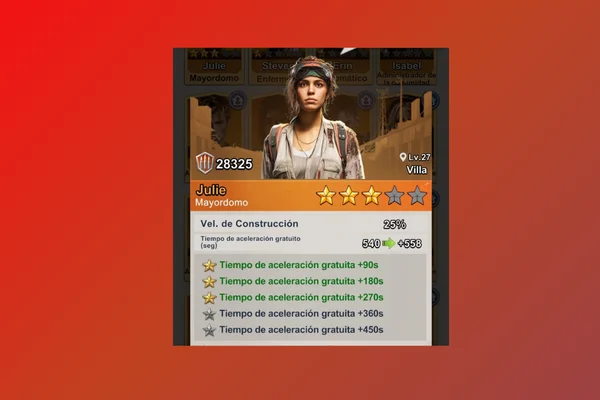
Butler and Diplomat refugees in Last Z

🎯 The 2 Most Important Refugees

Refugees grant permanent passive abilities. Not all are equally useful — these 2 are the ones you must prioritize:

🏗️ #1 — Butler

Main Ability: Construction Speed

Bonus: Free acceleration time when building

  • Drastically reduces building construction time
  • Grants additional free acceleration time
  • Useful from level 1 to endgame
  • Saves days or weeks of accumulated waiting
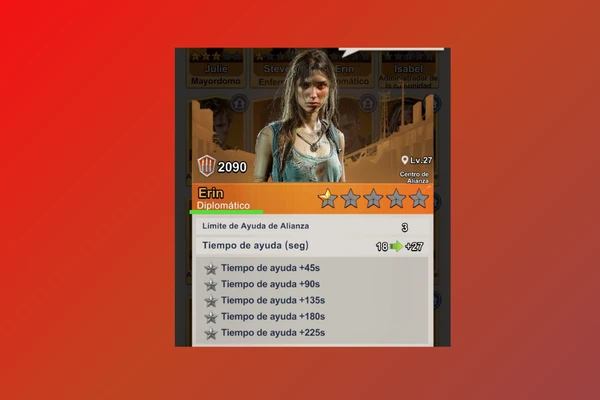
Butler refugee stats - Last Z

🤝 #2 — Diplomat

Main Ability: Alliance Help Limit

Bonus: More time reduced per help received

  • Increases how many alliance helps you can receive
  • Combines perfectly with the Butler
  • In active alliances, complete buildings almost instantly

🌟 Rarities

Even a green Butler beats other higher rarity refugees. Prioritize the type over rarity.

🎯 Recruitment Strategy

Priority 1: Butler → Priority 2: Diplomat → Priority 3: upgrade rarity.

💎 F2P Tip: Worth spending diamonds on these 2. They are one of the best investments in the game.

🏢 Recruitment Costs

  • 1st Refugee: 500 coupons or diamonds
  • 2nd Refugee: 2,000 coupons or diamonds
  • 3rd Refugee: 5,000 coupons or diamonds

Available refugees change every 12 hours. You get a free refresh after each recruitment.
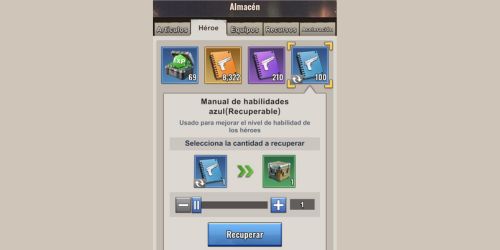
Leftover blue manuals can be recycled into boxes containing diamonds or Rank S hero fragments. Don't let them pile up unused.

Skill manuals in Last Z

📦 The 3 Manual Ranks

  • 🔵 Blue Manual → For Rank B heroes
  • 🟣 Purple Manual → For Rank A heroes
  • 🟠 Orange Manual → For Rank S heroes

✅ How to Recycle

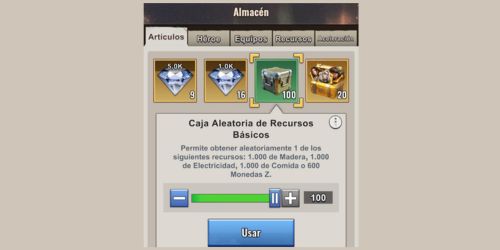
Step 1: go to Warehouse → Hero tab.

Step 2: find leftover Blue Manuals.

Step 3: if all your Rank B heroes are maxed, you'll see "Recycle".

Step 4: each manual becomes a Random Box that can give: Resources, 💎 Diamonds or ⭐ Rank S Fragments.

Recycling manuals in Last Z warehouse

💎 Key: open boxes in batches of 1,000. More at once = higher probability of Diamonds or S Fragments.

💡 Tip contributed by @Daff21 — thanks to the community!

Align 5 heroes of the same faction to get ATQ +115%. Prioritize Blood Rose in your first formation and its support buildings.

Faction formations in Last Z

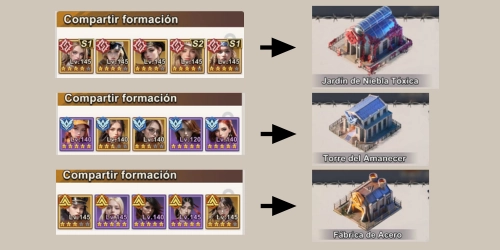
There are 3 factions: 🔴 Blood Rose, 🔵 Wings of Dawn and 🟡 Guardian. With 5 heroes of the same faction you get ATQ +115%.

🎯 Priority Order

1st — Blood Rose: easiest to get at the start + Toxic Mist Garden building.

2nd — Wings of Dawn: boosted by Dawn Tower.

3rd — Guardian: boosted by Steel Factory.

🏗️ Faction Buildings

1. Toxic Mist GardenHIGH Priority

2. Dawn TowerMEDIUM Priority

3. Steel FactoryMEDIUM Priority

💡 Rules

Keep formations pure (5 heroes same faction).

Don't mix factions — you lose the +115% buff.

Don't upgrade all 3 buildings at the same time.

💡 F2P: The +115% buff makes a huge difference in PvP and events. No money needed, just strategy.

Transfer your best armor between formations to maximize rounds. Move equipment from Rose → Dawn → Guardian as you progress.

Caravan Last Z - Armor Rotation

🏛️ The 3 Caravan Fields

  • 🔴 Blood Rose Field
  • 🔵 Wings of Dawn Field
  • 🟡 Guardian Order Field

⚙️ Rotation Steps

Step 1: enter Rose field with your 1st formation and best armor. Advance as far as possible and exit.

Step 2: equip that armor on your 2nd formation (Dawn). Enter and advance.

Step 3: move armor to your 3rd formation (Guardian). Enter and advance.

Step 4: return armor to your 1st formation when done.

Armor transfer between formations Last Z

💡 Why It Works

  • Your 2nd and 3rd formations are normally weaker
  • Borrowed armor = more rounds = better rewards
  • 100% F2P — costs no resources

⚠️ Remember: always restore armor to your 1st formation after Caravan ends.

Always check the "Auto Return" checkbox before marching. Your troops will come back automatically after combat — no manual searching needed.

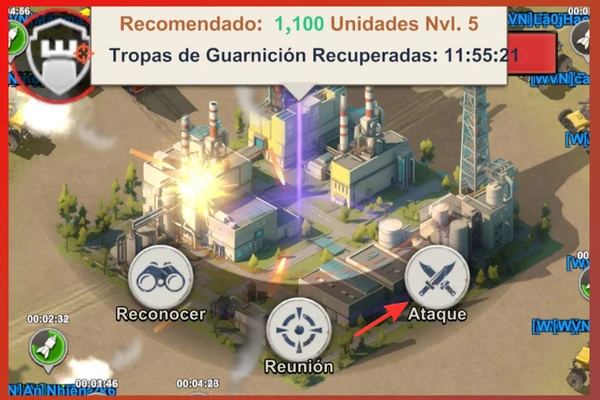
Attack panel with auto return - Last Z

✅ How to Enable It

Step 1: click on the target → select "Attack".

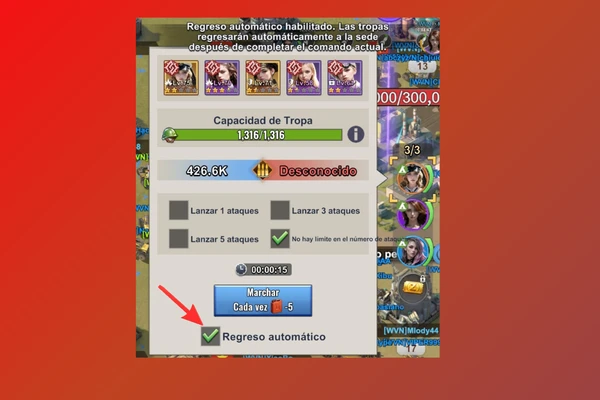
Step 2: find the "Auto Return" checkbox in the panel.

Step 3: make sure it's checked ✓ green.

Step 4: click "March". Troops return automatically after combat.

Auto return checkbox enabled - Last Z

⚔️ Always verify: don't assume it's enabled by default. Check before every attack, especially when farming multiple targets in a row.

Inside alliance territory, reinforcement is 3× faster than normal movement. Use it to reach treasures, strategic points and support allies urgently.

Fast reinforcement in alliance territory - Last Z

💡 How to Use It

  1. Identify an allied base or city near the target
  2. Send a reinforcement to that intermediate base (3× speed)
  3. From there, launch toward the final target

⚠️ Restriction

The 3× speed only works inside your alliance territory. Outside, normal speed applies.

🎯 When to Use It

  • To arrive first at alliance treasures
  • In alliance events where speed is critical
  • To quickly support rally points

⚡ In alliance events, seconds determine who gets the loot. Mastering reinforcement gives you a real edge.

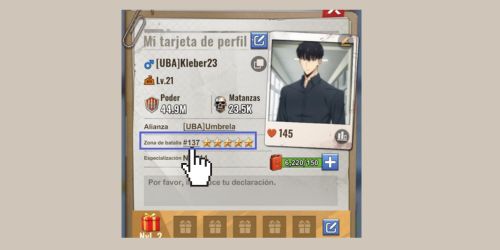
The server offers free official positions with very useful buffs. The Minister of Agriculture gives +35% gathering — essential for F2P players.

Server government in Last Z

📍 How to Access

  1. Click on your profile → find your War Zone
  2. Click that number → government interface
  3. Request the position that matches your needed buff

👑 Positions and Buffs

PositionBuffsBest for
👸 First LadyProduction +10%, Gathering +20%Farmers
🤝 Vice PresidentConstruction +5%, Research +5%Progression
⚔️ CommanderATQ +10%, DEF +10%Combat
🎖️ Supreme GeneralATQ +10%, Siege ATQ +10%Sieges
🏗️ Min. ConstructionConstruction +15%, +3,600s freeBuildings
🌾 Min. AgricultureGathering +35%, Prod +20%🔥 F2P
🔬 Min. ResearchResearch +15%, +3,600s freeLaboratory
🛡️ Min. DefenseSiege ATQ/DEF +10%Wars

💡 Key: Positions are completely free. Request one right before building, researching or gathering to maximize each buff.

Don't use "Heal All" at once. Healing in small batches lets your alliance reduce the time and heal your troops without spending speedups.

Hospital with injured troops - Last Z

❌ The Common Mistake

Selecting "Heal All" at once → very long time → you spend speedups.

✅ The Right Strategy

Step 1: DON'T use "Heal All".

Step 2: check how many alliance members are online.

Step 3: heal a small batch — the time will be short.

Step 4: your alliance reduces that time with their helps.

Step 5: repeat until all troops are healed without spending anything.

Alliance help for healing - Last Z

🎯 Best moment: after events like "The Tyrant", when many members are online. Heal all your troops without spending anything.

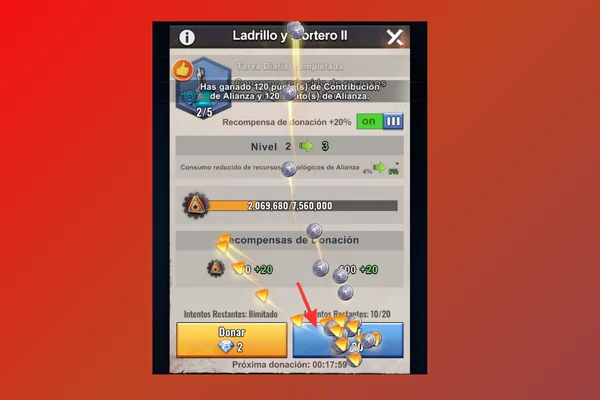
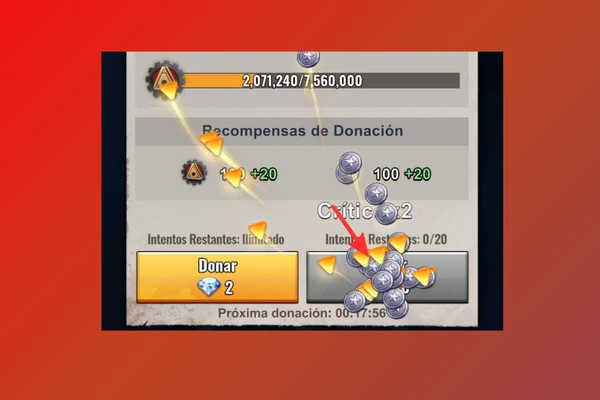
Hold down the donate button instead of individual clicks. Activates automatic multipliers ×2, ×5, ×10 to donate much faster.

Alliance technologies in Last Z

✅ The Trick

Hold down the donate button. Multipliers will appear:

  • 🔥 ×2 → donate double
  • 🔥 ×5 → donate 5 times more
  • 🔥 ×10 → donate 10 times more
Donation multipliers activated - Last Z

🔥 Extra: contribution points are used in the Alliance Shop for speedups, resources and fragments. The more you donate, the more you can buy!

Click on the coordinates in the scout report and the map takes you directly to that base. No manual searching — essential for coordinating alliance attacks.

Scout report in Last Z

✅ The Trick

Step 1: open the report (from mail or shared chat).

Step 2: below the player name you'll see coordinates (e.g.: X:324 Y:772).

Step 3: click directly on those coordinates.

Result: the map automatically goes to that base. No manual search.

Clickable coordinates in scout reports - Last Z

💡 Use Cases

  • Coordinate attacks — everyone reaches the target quickly
  • Check distance before deciding to attack
  • Find weak bases shared in chat

🔍 Works on any scout report — mail or chat. Use it whenever you need to locate a base quickly.

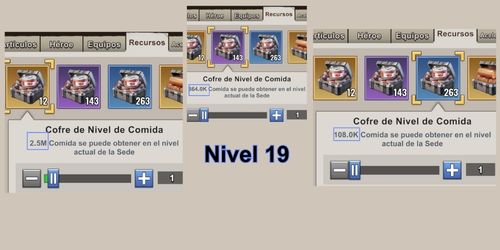
Golden boxes scale with your HQ level. The same golden box at HQ level 27 gives 10x more resources than at level 15. Don't open them early.

Resource boxes in Last Z

📦 Box Types

  • 🟦 Blue → Use freely when needed
  • 🟪 Purple → Save until level 20–23
  • 🟨 GoldenDON'T open until level 27+

📈 Strategy by Level

LevelBluePurpleGolden
1–15UseSaveSave
16–23UseIf neededSave
24–26UseUseSave
27+UseUseOpen!

🔥 Real example: 50 golden boxes saved from level 10 to level 28 = over 20 billion resources when opened.

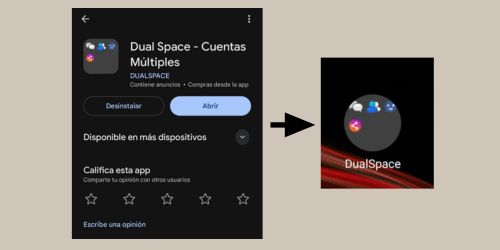
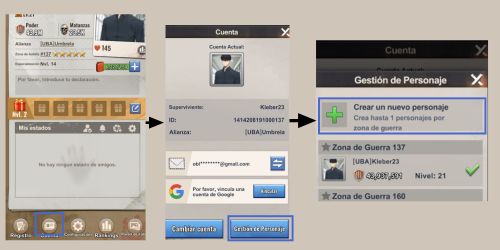
Secondary accounts to generate extra resources and send them to your main account. Two methods: Dual Space or free teleport during events.

Farm account in Last Z

📱 Method 1: Dual Space

  1. Download Dual Space (Android/iOS)
  2. Install a second copy of the game inside it
  3. Go to Profile → Account → Character Management → Create New
  4. Select your server
Dual Space for farm accounts - Last Z

🚀 Method 2: Free TP (Saturdays)

  1. During Server War, teleport to another zone
  2. Go to Profile → Account → Character Management → Create New
  3. Select your original server

💡 Efficient Farm Rules

  • Join your own alliance for direct donations
  • Only upgrade production — keep power low
  • Use cheap shields for protection

⚠️ Check game rules on multi-accounts. Avoid using them to manipulate rankings.

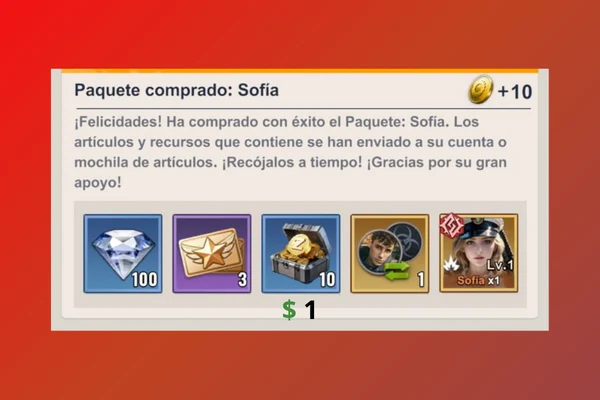
If you're going to spend, $3 dollars give you the biggest advantage: Sophia ($1) reduces construction time and the 2nd Builder ($2) lets you build 2 buildings at once.

Sophia builder hero - Last Z

🎯 Purchase #1: Sophia — $1 USD

  • Rank S hero — top quality
  • Reduces building construction time
  • Useful throughout your entire progression

🔨 Purchase #2: 2nd Builder — $2 USD

  • 2 simultaneous buildings — doubles your progress
  • Best investment for new players

📊 F2P vs $3 USD

AspectF2PWith $3
Construction speedNormalReduced
Builders1 building2 simultaneous
Time to level 20~3–4 weeks~1.5–2 weeks

⚠️ Avoid at the Start

  • Resource packs — you get them free in events
  • Speedups — events give them
  • Random heroes — too RNG

Do you know a tip that's not here? Share it with the community on our social networks.

← Back to Home